Secure configuration

Close the configuration gaps that put your services at risk.

Agentless checks on Windows, Linux and Intune devices show what is wrong and how to fix it, before it becomes an audit finding.
SECURE CONFIGURATION OPEN FINDINGS HIGH 1,022 MEDIUM 702 LOW 1,374 3,098 open / 4,580 recorded (illustrative) MALWARE COVERAGE 96% 546 / 568 covered covered uncovered CONFIGURATION DRIFT finding reopened a GPO undid the fix Checks cover: Windows Linux Intune TLS Network config Finding reopened Expected against observed. With the fix beside it.
In the console

See what to harden first

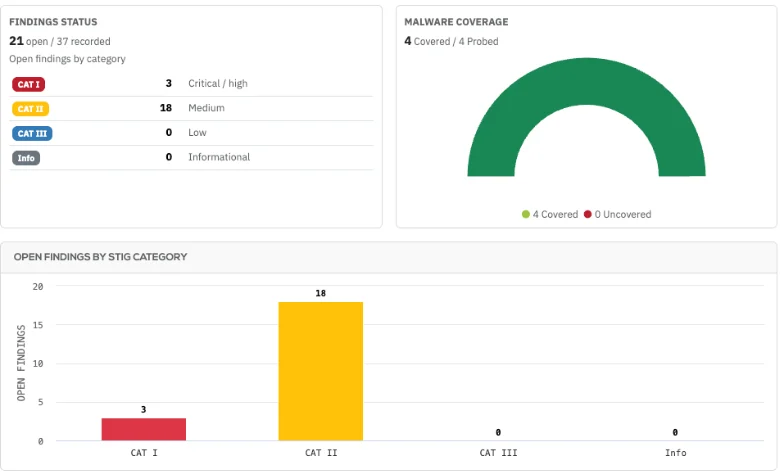
Open findings are grouped by severity and STIG category, beside your malware coverage.

From a Rebasoft demo estate.
What gets checked

Agentless checks replace the manual hardening audit

A hardening audit is out of date soon after it ends, and agent-based tools add software to every machine. Rebasoft reads these settings at each collection, with nothing to install.

DISA STIG rule library

Rebasoft holds around 19,000 DISA STIG rules, the US Department of Defense hardening baseline, with their fix text, as the reference behind its checks.

Windows hardening

Keyed to DISA STIG rules for Cyber Essentials, covering SMBv1, LAN Manager hashes, LLMNR, UAC, autorun, automatic logon, screen lock, anonymous enumeration, host firewall on all three profiles, Remote Desktop NLA, AppLocker, anti-malware, and automatic updates for Windows and Store apps.

Linux hardening

SSH root login, SSH password authentication, extra UID 0 accounts, host firewall, audit daemon and automatic security updates.

Intune compliance

Compliance state, management state, disk encryption, active anti-malware and signature freshness.

TLS and certificates

Expired or expiring certificates, old protocols, weak ciphers and short keys, across the estate and by service.

Network configuration

Backups of device configurations, a comparison showing what changed on a switch or firewall, and an audit view of AAA use and SNMP community strings, including read-write and default communities.

Fix what matters

Findings arrive with the fix attached

Most reports stop at a failed check. Rebasoft shows your team what to change, which shortens the investigation.

Expected
The required state

The value the setting should hold.

Observed
The actual state

The value read from the machine, shown on the asset’s Security page.

Fix
The remediation

Fix text for the setting, for your team to apply with its existing tools.

Configuration drift in practice

A reversed fix no longer waits for the next audit

  1. Monday

    SMBv1 is found enabled

    A collection cycle reads the setting on a file server by PowerShell, without an agent. The check fails and a finding is raised.

  2. Monday

    The remediation is documented

    The asset’s Security page opens a drawer showing the expected value, the fix text and reference material on why the setting matters.

  3. Tuesday

    The team applies the fix

    SMBv1 is disabled with the team’s existing tools, and the next collection resolves the finding.

  4. Weeks later

    The setting reverts

    An older Group Policy undoes the change. The next collection reopens the same finding with its history intact.

  5. Next review

    The cause is addressed

    The reopened finding is on the Security page, so the team corrects the Group Policy itself. The finding’s history shows the full sequence for any later audit.

A composite example based on product behaviour.

Evidence you can rely on

Green means checked

Unlike a report that counts the hosts it reached, Rebasoft never treats an unreachable host as a pass. It reports Not assessed and gives the reason, so a gap is never mistaken for a pass.

Patching412 of 412 devices checked
Pass
Malware protection3 devices with no protection
Fail
Secure configuration38 devices unreachable: credential rejected
Not assessed
Illustrative example
Consolidation

Retire the manual audits and certificate spreadsheets

Manual hardening audits
Can replace
The same settings, read at each collection, in place of an audit that ages the day it ends.
Certificate spreadsheets
Can replace
Certificate expiry and TLS strength across your HTTPS services, with nobody maintaining a list.
Network config backup tools
Consolidates
Device configuration backup and version comparison, in the same place as your asset and risk data.
FAQ
Do we need to deploy an agent?
No. Rebasoft reads Windows by PowerShell, Linux by SSH and Intune through Microsoft’s APIs, using credentials you provide, so there is nothing to deploy or maintain on endpoints.
How often are settings re-checked?
Settings are read each time collection runs, so a change appears on screen and in reports after the next collection, well ahead of your next audit.
What does this add to Intune?
Rebasoft brings hosts outside Intune, Linux servers, TLS and network configuration into the same place as your Intune devices, which gives your team a single view of configuration.
Does it change anything on our hosts?
No. Rebasoft is read-only by design, so your hosts stay exactly as they are and your team stays in control of each change.
Does it support Cyber Essentials?
Yes. The host checks feed the Cyber Essentials verdict and submission workbook, which removes a large part of the evidence gathering.

More questions? See the full Rebasoft FAQ — answers by topic and by role, or how Rebasoft is priced.

See secure configuration on a live console

In thirty minutes, follow a finding from detection through remediation, and see how much manual audit work it removes.