
Which assets support your services, and what is missing?
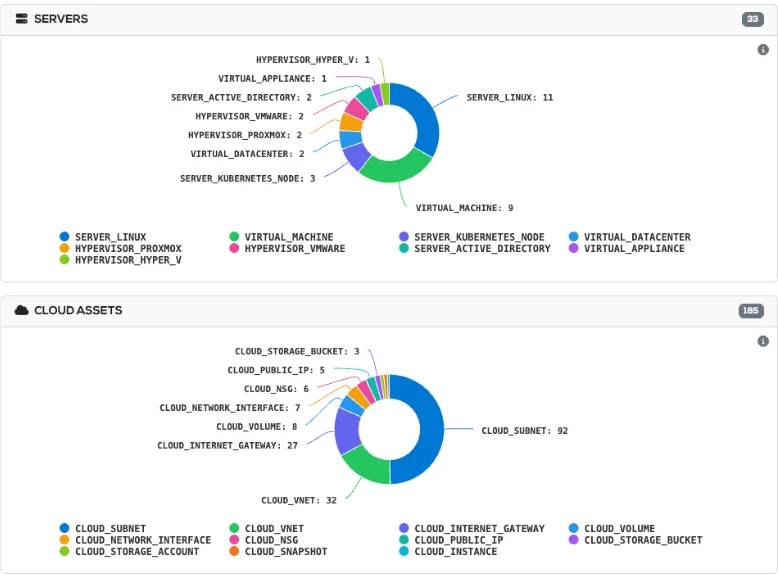
Every asset type, counted
Servers, hypervisors and cloud resources appear in one inventory, broken down by type.
A six-stage ladder shows how well you know each asset
A device count says how many, and leaves you guessing how much you really know. The ladder tracks each asset from first detection to CMDB-ready, and security and compliance work starts from the third stage.
An address has been seen on the network.
The address is a known asset of a recognised type.
Collection has succeeded, and software and patch data are available.
A named owner is responsible for the asset.
Cover and warranty are in order.
The asset is complete enough to rely on as a configuration item.
Discovery gaps arrive with a cause and an owner
A failed-device report leaves your team to work out what went wrong. Rebasoft groups failures by cause and owner, which turns detective work into a short list of jobs.
- 08:50
The ladder shows a stall
The IT manager sees too few assets reaching Inventoried, a pattern that a device count would have hidden.
- 08:55
Failures are grouped
Discovery Progress clusters the failures, so she works through a short list of issues rather than a long list of devices.
- 09:05
The pattern points to the cause
Hosts that are down across many sites are usually powered-off desktops. The same number down in one subnet points to a routing change, so that cluster goes to the network team.
- 09:15
Credentials are handled with care
A rejected credential is reported separately from a missing one. Rejected credentials are not retried automatically, so collection does not resemble credential stuffing to your intrusion detection system.
- 09:30
Each team receives its own work
She passes each cluster to the team that can resolve it, and the ladder recalculates hourly as the fixes take effect.
A composite of real customer situations. Figures are illustrative.
A single asset inventory, drawn from the sources you already run
Several tools usually mean several asset lists and a spreadsheet to settle the differences. Rebasoft ranks its sources, from your own entries through MDM, hypervisor, cloud, network and flow, so your team stops comparing lists and works from one set of facts.
Devices that leave management
When Intune stops listing a laptop that the network can still see, Rebasoft keeps it live and flags it as unenrolled. A list from one tool would lose it, and a working machine would drop out of view.
Protection against bad data
If a single pull would retire more than half of a group, Rebasoft refuses the list, so a credential that has lost its scope cannot empty your register.
Servers found through traffic
With flow exports in place, a host serving a stable port to many clients joins a review queue with its reasons, which surfaces hosts that credentials miss. Your team makes the decision.
End-of-life, web and cloud data arrive with no manual research
Where a spreadsheet goes stale, these views refresh from collection. Contract, supplier, warranty, stock and entitlement fields sit alongside them, ready for your team to enter or import.
End of life from 17 sources
Your team sees what is leaving support, asset by asset, with no vendor research. Operating systems, applications and hardware are checked against 17 sources, updated weekly.
Web technology detection
Ageing WordPress and jQuery surface through 53 detection rules, with or without a device behind the site. Where a site reports PHP with no version and SSH collection covers the host, Rebasoft supplies the version from the installed package.
Cloud and virtual sources
One view takes the place of a console per platform. AWS and Azure arrive with a depth ladder for each VM, next to VMware, Proxmox and Hyper-V hosts and guests and Kubernetes clusters, pods and containers.
Discovery is where Rebasoft began
Network discovery has been the core of Rebasoft since 2009. It has been refined on live estates with customers and partners, so it copes with the legacy equipment and unexpected devices real networks contain.
Retire the asset spreadsheets
From the blog

7 Best SaaS Discovery Tools for Clearer Control
Compare the best SaaS discovery tools for continuous visibility, risk prioritisation and audit-ready evidence across your organisation’s cloud estate.
Read article
How to Classify Critical Assets by Business Impact
Learn how to classify critical assets using service context, dependency mapping and evidence to reduce cyber risk, improve resilience and focus action.
Read article
CMDB Versus Asset Discovery: What You Need
CMDB versus asset discovery: understand what each delivers, where records fail, and how visibility strengthens risk, resilience and audit evidence daily.
Read articleDo we need an agent on each device?
What does setup involve?
Where is our data held?
More questions? See the full Rebasoft FAQ — answers by topic and by role, or how Rebasoft is priced.
See how far discovery reaches on an estate like yours
In thirty minutes on a live console, you will see the ladder, the blockers and the team each one belongs to.