How it works

Follow the evidence behind a critical business service.

One agentless deployment gives operations, security and governance the same facts about the assets, risks and evidence behind the services you run.
Business service assurance live
Collected without agents, in a single inventory
UsersNetworkServersContainersCloud
organised into business services
Business service Business-critical
Customer Portal
Owner: IT Operations Tracked over time
feeds
OperationsSecurityGovernance
A worked example

Follow the payments service through four questions

  1. Known

    What does payments rely on?

    You group the assets behind payments into a business service. Traffic analysis then proposes a host nobody documented, and an engineer accepts it in one step.

  2. Secure

    What threatens it?

    The host inherits the importance of payments, so its vulnerabilities move up the team’s work list. A known-exploited flaw on the payments web server outranks a CVSS 9.8 on an isolated test system.

  3. Compliant

    What can you prove?

    Configuration, identity and Cyber Essentials evidence comes from collected data. A device that could not be checked shows as Not assessed, so a gap never passes as assurance.

  4. Working

    What happens when something fails?

    A server stops being seen. Rebasoft shows which services it belongs to, so your team knows straight away where to look.

An illustrative example.
In the console

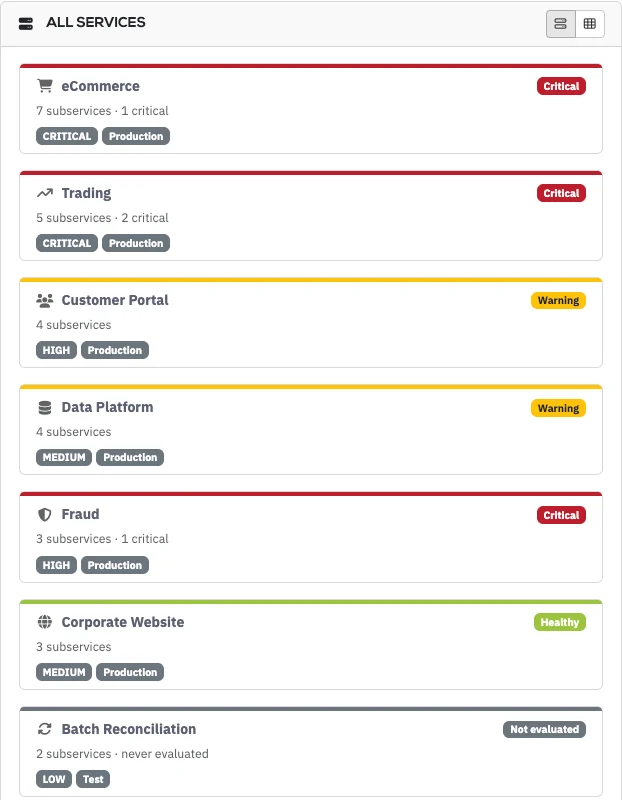
Every service, and where it stands

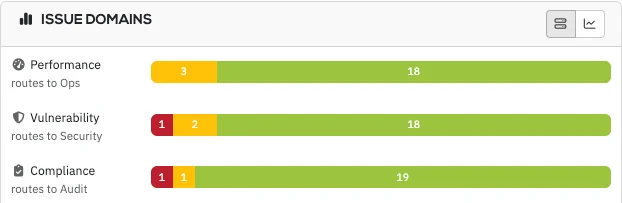
Each service shows its status, importance and subservices. Issues split into performance, vulnerability and compliance, and route to the right team.

Sample data.
How it collects

The data you already own, put to work

Rebasoft collects without endpoint agents and reads the systems you already run, which is why first results arrive within days.

Know what is connected

ARP and switch tables, SNMP, and LLDP and CDP topology show your devices and how they connect, in place of diagrams someone has to maintain.

Tie traffic to assets

NetFlow, IPFIX, sFlow and AWS and Azure flow logs show which asset is talking to which, from telemetry you already export.

Inventory hosts without agents

PowerShell, WMI and SSH collect installed software and host detail from Windows, Linux, Unix and macOS, with nothing to install.

See cloud, virtual and mobile together

VMware, Hyper-V, Proxmox, AWS, Azure, Kubernetes, Intune and SOTI appear in the same inventory as your physical estate.

Put a figure on Microsoft 365

Microsoft Graph brings in Entra and Microsoft 365 data, and shows licence savings in money.

See SaaS and AI use by person

The proxy and DNS logs you already have show who uses which SaaS and AI services.

Better data

Cleaner data gives your team better answers

A single asset inventory

Where separate tools each keep their own list, Rebasoft applies a ranked order of sources and draws them into a single inventory.

Findings arrive filtered

A signed feed from NVD, the CVE List, over 100 vendors, KEV and EPSS is weighed against what is installed, so findings that do not apply drop out and the rest arrive with their reasons.

Sources correct each other

When Intune stops listing a laptop that the network still sees, Rebasoft flags it as unenrolled, a distinction a management tool alone does not make.

Evidence you can rely on

Green means checked

A green dashboard is worthless if nobody knows what it missed. Rebasoft runs the collection itself, so green means verified. Anything it could not verify is shown as Not assessed, which protects you from false assurance.

Patching412 of 412 devices checked
Pass
Malware protection3 devices with no protection
Fail
Secure configuration38 devices unreachable: credential rejected
Not assessed
Illustrative example
Where it runs

Your data is held on your infrastructure, in a deployment of your own

Separated by design

Each customer has its own Rebasoft deployment, and roles confine people, reports and API tokens to their sites.

Simple to stand up

Virtual appliances run on the VMware, Hyper-V, Proxmox or Azure you already have, with three VMs in production. See how deployment works.

Under your control

Your team or your partner runs it, and your data is held on your infrastructure rather than in a shared service.

Questions
Does Rebasoft need endpoint agents?
No. Rebasoft collects over the network and through APIs, so there is nothing to deploy to endpoints and nothing to maintain on them. See how deployment works.
Can we build our own reports?
Yes. Standard dashboards and reports, a custom builder, scheduling, PDF output and branding profiles turn recurring reporting from a manual job into a scheduled one.

More questions? See the full Rebasoft FAQ — answers by topic and by role, or how Rebasoft is priced.

Follow the evidence on your own estate

In a 30-minute walkthrough of a live console, you’ll follow a service from its assets to the next action for your team.