
Who in finance just started using ChatGPT?
Outside services are part of the answer when the board, insurers or customers ask how your critical business services are protected.
See what your people really use
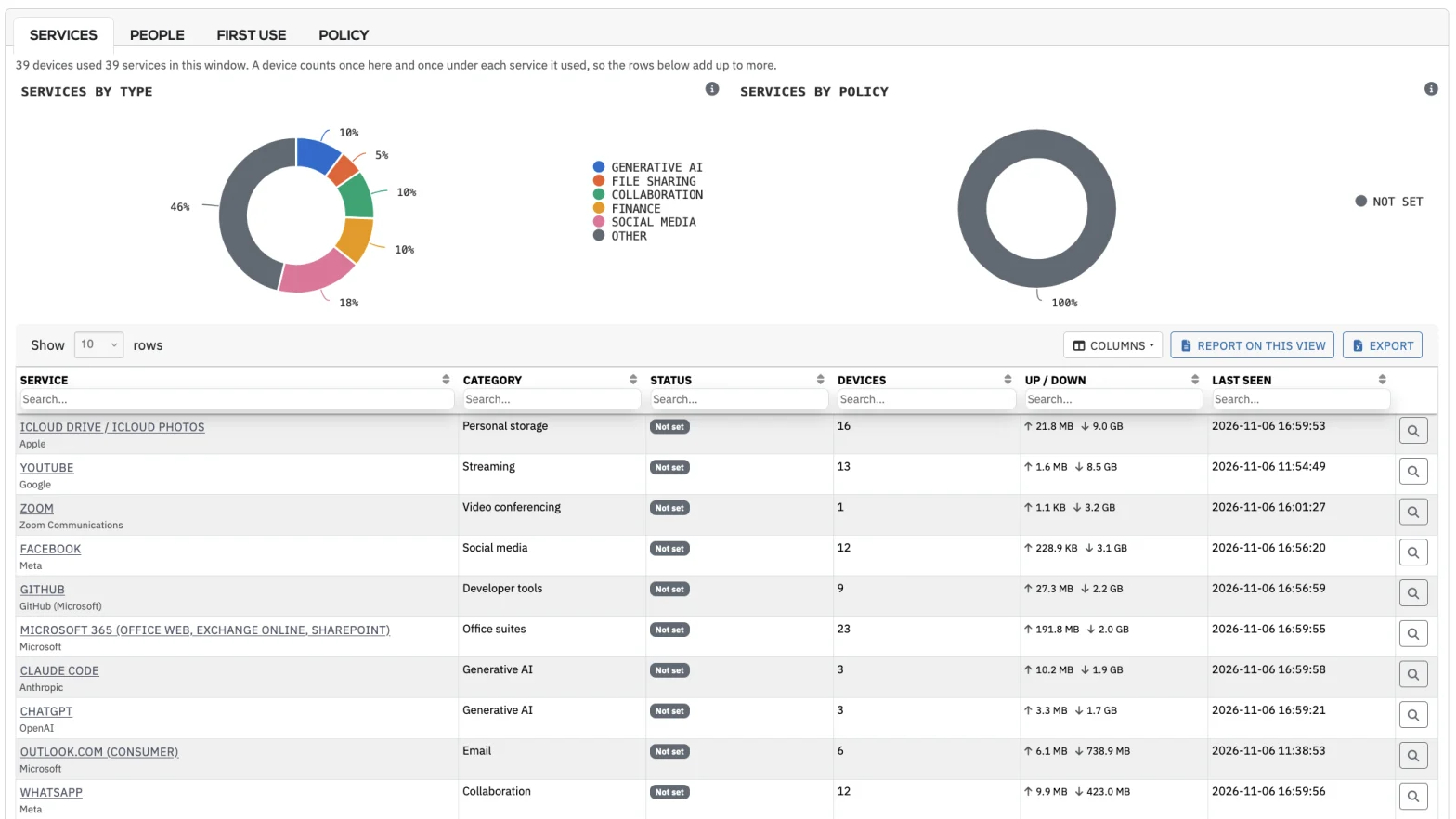
Charts show services by type and by policy, with devices and traffic for each service, from generative AI to personal storage.
Replace guesswork about AI use with evidence
Surveys and policy statements tell you what staff say they use. Rebasoft shows what your network has actually seen, so you answer boards, insurers and customers with confidence.
485 services
Reports show service names, which ends the work of tracing IP addresses and domains.
97 generative AI services
ChatGPT and its peers sit in their own category, ready for reporting and policy.
14 log sources
Proxy and DNS sources are read directly, alongside dnstap and flow data, so you start from what you already collect.
Your existing logs deliver the answer, with nothing to deploy
Rebasoft reads Zscaler, Netskope, Cisco Umbrella, Palo Alto, FortiGate, Check Point, Sophos, Forcepoint, Skyhigh, Menlo, iboss, Cloudflare Gateway, ProxySG and Squid, with no agent and no change to how traffic flows. Your team sees which service was used, by whom and how much, and staff prompts and content stay private, because Rebasoft does not read them.
First use appears on a review list, with a name beside it
- 10:12
A finance workstation reaches ChatGPT
This is the first time the site has used the service from a workstation, and the proxy log or DNS identifies the host.
- 10:12
The catalogue identifies the service
The analyst will see ChatGPT, categorised as generative AI, with no policy decision against it, in place of an address or a domain.
- 14:00
It appears on the First use list
Because the service has no policy decision, it joins the review list and remains there until someone makes a decision.
- 14:05
The person is identified
The analyst opens SaaS & AI, where the proxy login, matched through your identity directory, provides a name.
- 14:10
A decision is applied
She marks the service as allowed or not allowed. The policy reaches every collector and the finding is resolved.
A composite. Times are illustrative.
Set policy once and see use person by person
Allowed or not allowed
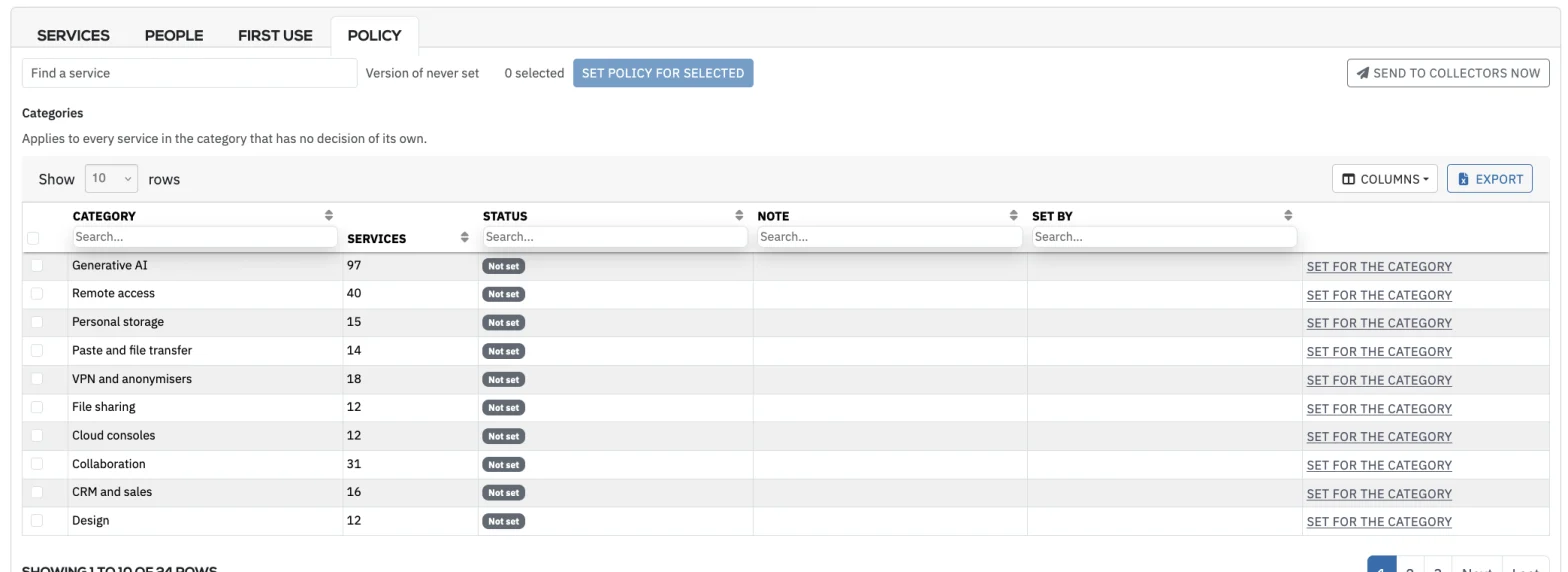
Set policy by service or by category, and it reaches every collector. Reports separate allowed use from use that is not allowed, so decisions stay visible.
A view by person
Unlike a domain report, this view shows who uses generative AI, busiest first, with the same view for remote access, personal storage, file transfer, file sharing, VPNs and anonymisers.
Alongside the device
SaaS use appears on the device’s asset page, next to its vulnerabilities and owner, so your team sees use in context.
Decide what is allowed
Set a category or a service as allowed or not allowed. A category decision applies to every service in it that has no decision of its own.
Retire the surveys and the separate discovery reports
From the blog

7 Best SaaS Discovery Tools for Clearer Control
Compare the best SaaS discovery tools for continuous visibility, risk prioritisation and audit-ready evidence across your organisation’s cloud estate.
Read article
How to Classify Critical Assets by Business Impact
Learn how to classify critical assets using service context, dependency mapping and evidence to reduce cyber risk, improve resilience and focus action.
Read article
CMDB Versus Asset Discovery: What You Need
CMDB versus asset discovery: understand what each delivers, where records fail, and how visibility strengthens risk, resilience and audit evidence daily.
Read articleHow do we act on a service we do not want?
Do we need a proxy?
When does First use begin?
Do we need an agent?
How does this relate to staff monitoring?
More questions? See the full Rebasoft FAQ — answers by topic and by role, or how Rebasoft is priced.
See what your logs already show
In thirty minutes on a live console, you will see the catalogue, the First use list and the view by person.